
Level One - Foundations - Regulate Yourself
Welcome to
Module Two:
The Regulation
Toolkit
Module One gave you the map. This is where you get the tools.
Before our first call, there are two documents here for you to download and look over. You do not need to read everything cover to cover before we meet. Flick through them, get familiar with the structure, and bring them to the call. We will be working through the content together.

Your Module Two Downloads
Module Two Reference Book
The Regulation Toolkit
Your permanent reference for everything covered in this module. Bring it to the call and keep it. Seven sections, all the science, the key terms, and the decision framework you will be reaching for all week. The Zoom call will be uploaded within 24 hours.
Module Two Workbook
Click the button below to open your workbook in Google Drive. Once it is open, follow the instructions for your device to fill it in digitally, or print it and bring it to the call.
How to fill in your workbook
On a computer (Mac or PC)
Click the button above to open the file in Google Drive. In the top right corner of the viewer, click the download arrow to save the PDF to your computer. Once downloaded, open it in Adobe Acrobat Reader (free at adobe.com) or in Preview if you are on a Mac. Click into any field and type directly. Save the file when you are done and keep it somewhere easy to find.
On an iPad or tablet
Download the free Adobe Acrobat app from the App Store or Google Play. Click the button above, tap the three dots in the top right corner of the Google Drive viewer, and choose Open In, then select Adobe Acrobat. Tap any field to type, or use Apple Pencil or a stylus to write by hand. Save when done.
On a phone
Same as above. Download Adobe Acrobat, open the PDF through the app, and tap the fields to fill in. The workbook is designed for A5 so it reads well at mobile scale.
If you prefer pen and paper
Print the workbook before the call. All the fields work just as well with a pen. Bring it to the Zoom session and write in it as we go.
One important note
Google Drive will let you view the PDF but not fill it in directly. You need to download it first, then open it in Adobe Acrobat or Preview. That is the only step that catches people out. Once it is downloaded, everything works exactly as expected.
A free Adobe Acrobat Reader account is all you need. It takes two minutes to set up at adobe.com if you do not already have one.
Keep your workbooks
Each module has its own workbook. By the time you reach Module Three you will have three documents that build on each other. Keep them in a folder together. The Decision Framework you personalise in Section 2.7 this week becomes something you will return to throughout the certification.

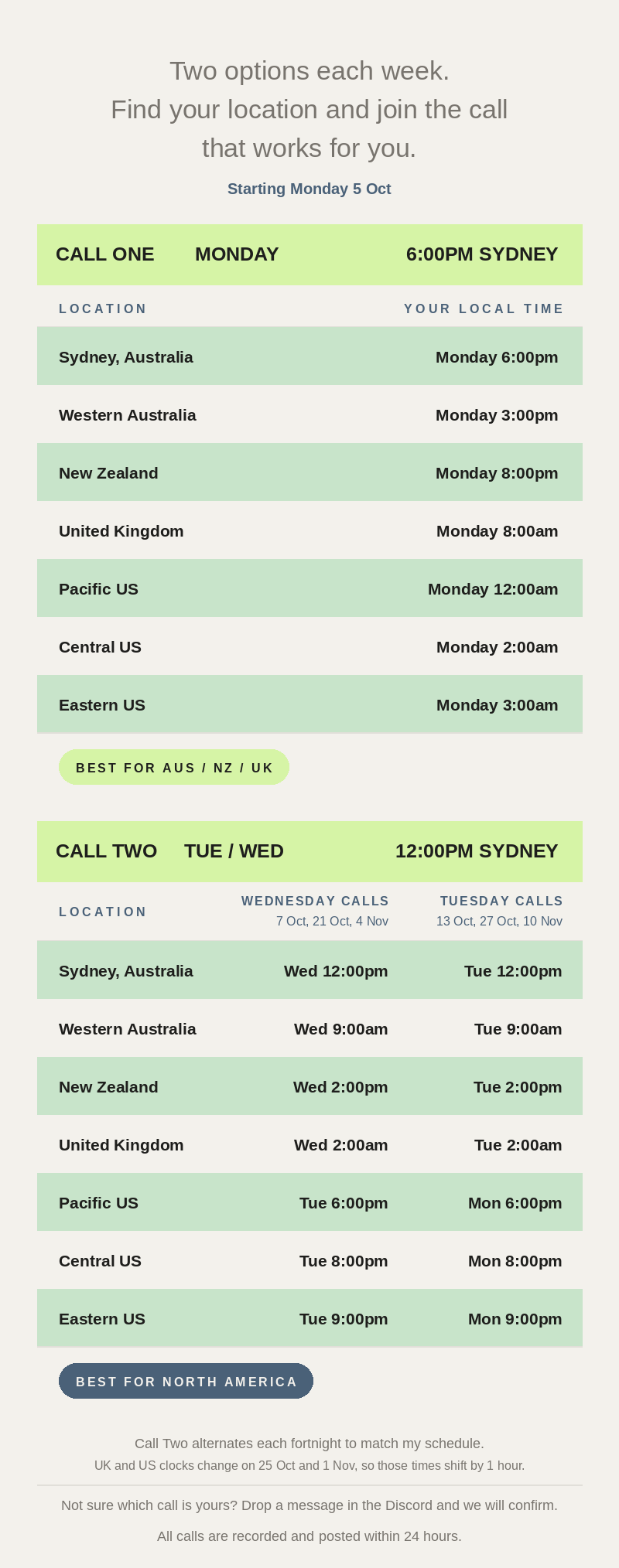
Our Weekly Zoom Schedule